What the numbers mean in Colony Flow
The number on a queue tile shows how many matching blocks its squad can collect. Use it with the board edge to estimate how much of the job the squad can handle now.
Verified on build 2026.09.28.019 (November 25, 2026)
On this page
How do you tell the red-crested bird’s squads apart?
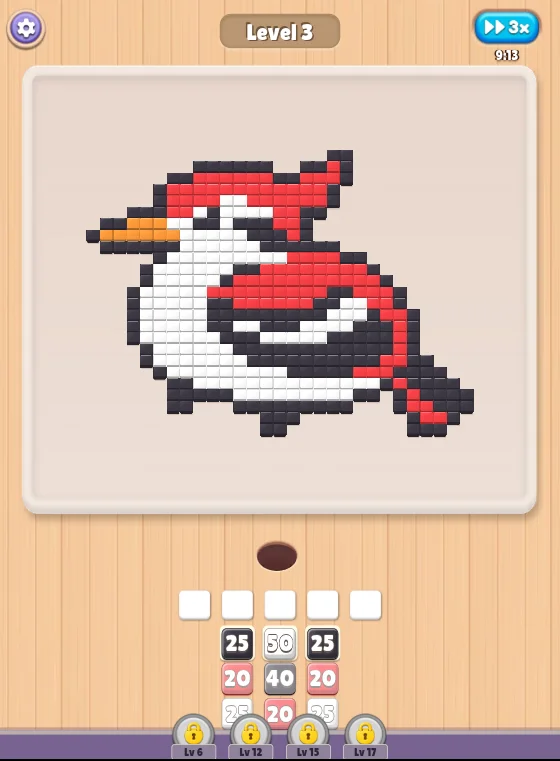
- The outside black nests both show 25. The white 50 in the middle is a different job, even though it shares the same row.
- Play the opening three nests, then wait for room before selecting red 20, black 40 and red 20. There are now two red 20s on different sides. Use both color and column to follow the walkthrough.
- At the end, one orange 9 appears in the middle. Check that it matches the remaining orange patch at the beak before sending the last squad.
A tile number is the squad’s capacity. Record the color, number and position together when you read a move order, especially if two nests show the same number.
How do you use the number before a move?
Compare the tile number with the matching blocks that look reachable. A tile marked 6 can collect six blocks. If you can see only two reachable matches, look for a move that opens more of that color or leave enough room to send another squad afterward.
- Read the number on the tile.
- Scan the edge for blocks of that color.
- Check whether removing those blocks could expose more of the same color.
- Decide whether the squad has enough work to justify using an active space.
When can a smaller squad help?
A smaller squad can help when its matches are exposed and you need to free a space. On the bird board, orange 9 is the last move because it fits the beak that remains. Earlier, the same color would have to wait for the surrounding picture to come away.
What does the number leave for you to work out?
The board tells you which blocks the squad can actually reach. Use the number as capacity and the current edge as your guide to access. Recheck both after the picture changes.