How to read the ant queue in Colony Flow
Pick a tile from the front of a queue column. On the Level 2 cat board, the queue starts with three columns and recenters when only one tile remains.
Verified on build 2026.09.28.019 (November 25, 2026)
On this page
How do you find the last black nest after the queue shifts?
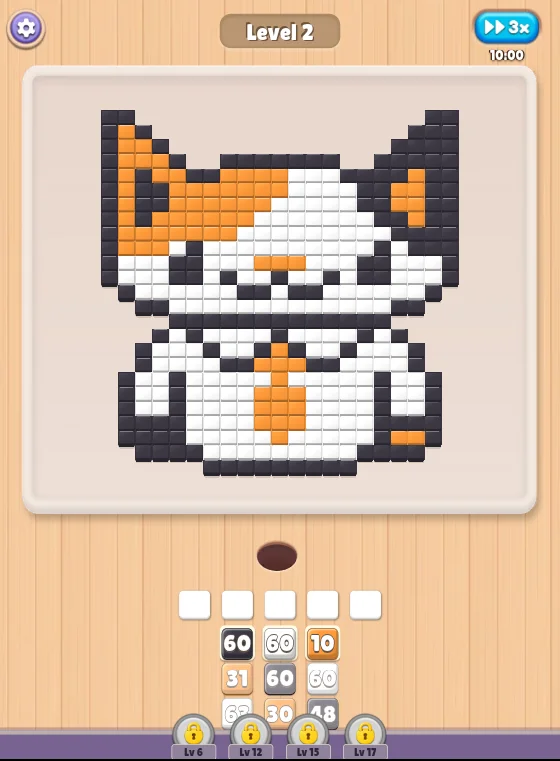
- The cat board starts with three columns, headed by black 60, white 60 and orange 10. Send them in that order. The next row becomes orange 31, black 60 and white 60.
- After enough spaces open, send that second row. Later in this route, white 63 and orange 30 are the last nests in their respective columns.
- After spending white 63 and orange 30, find black 48 in the middle. Confirm its color and number before tapping. Its former column position is no longer a useful landmark.
A column tells you where a nest is at that moment. Recheck the row after each disappearance and match moves by color and number.
Which tiles can you tap?
Look directly below the active spaces. The nearest tile in each column is the one you can release. On the Level 2 cat board, the front starts with black 60 on the left, white 60 in the middle and orange 10 on the right. Read the tiles behind them to see which color each choice will bring forward.
Why does a tile move to a different column?
When a column runs out, the remaining tiles can move toward the middle. In the verified Level 2 route, the black 48 tile shifts to the center after the white and orange columns are exhausted. After each tap, check the current layout by color and number before choosing the next tile.
How do you plan a move with the queue?
Check which front tile can collect exposed blocks now. If two look useful, look at the tile immediately behind each one. A move can clear part of the picture and bring forward a color that can use the opening. Keep an active space available for that next squad.